

You try logging into a website and suddenly you’re locked out. No warning, no explanation, just a brick wall. Most people assume they’ve been “banned,” but that word covers three completely different things depending on how the platform decided to shut you out.
Here’s why it matters: the solution depends entirely on which type of block hit you. Get it wrong and you’ll waste hours trying fixes that won’t work.
IP Blocks: The Network-Level Lockout
Think of your IP address like your home’s mailing address on the internet. Every time you visit a website, you’re essentially showing up at their door with that address visible.
An IP block means the website told its servers to slam the door on anyone coming from your specific address. You won’t even get to see a login page. Usually it’s a “403 Forbidden” error, or the site just hangs forever.
What gets you IP banned? Hammering a site with requests is the big one (we’re talking hundreds of page loads in under a minute). Too many failed password attempts will do it. Anything that looks like bot behavior. Once you land on their blacklist, you’re done. For a deeper look at the mechanics, the how do ip bans work MarsProxies guide breaks down exactly what happens on the server side.
The problem with IP blocking is it’s basically a sledgehammer. Britannica points out that innocent people get caught all the time, especially when ISPs recycle addresses or when you’re sharing a network with someone who triggered the ban.
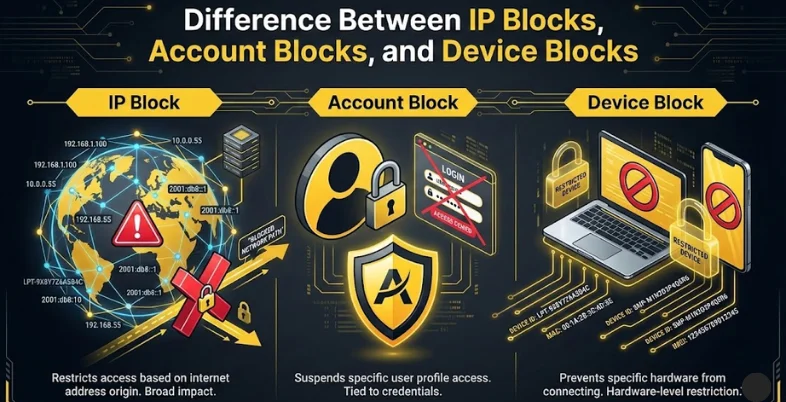
Account Blocks: They Know Who You Are
Account suspensions work differently. The platform isn’t blocking your connection; they’re blocking you. Your email, your phone number, your entire profile history.
This one follows you everywhere. Switch to mobile data, use a friend’s wifi, fly to another country. Doesn’t matter. Your credentials are flagged in their system.
Platforms hand out account bans for the usual stuff: posting something that violates their rules, weird payment activity, getting reported by other users. Facebook’s AI supposedly identifies users with 97% accuracy now, which makes creating a “fresh start” account harder than people think.
And these bans have memory. If you’ve gotten warnings before, the next offense hits harder. First violation might be a day timeout. Second could be a week. Keep pushing and you’re looking at permanent removal.
Device Blocks: The Sneaky One
This is where things get technical. Platforms can identify your specific computer or phone based on dozens of tiny details: your screen size, what fonts you have installed, your browser settings, even how your graphics card renders certain images.
All of that combines into a “fingerprint” that’s surprisingly unique to your device. Research out of Texas A&M found that device fingerprinting tracks people even after they clear cookies or switch to a different browser. About 83.6% of browsers tested had fingerprints unique enough to identify them individually.
That’s what makes device blocks so effective. You can get a new IP address in five minutes. Creating a new account takes two minutes. But your device fingerprint? That stays the same.
Gaming companies love this approach. Someone gets banned for cheating, makes a new account, and gets caught again within hours because the system recognized their machine. Financial services use it heavily too.
Also Read: AI HR Software
Why the Distinction Matters
Each block type targets a different layer of who you are online. IP blocks hit your connection. Account blocks hit your identity. Device blocks hit your actual hardware.
So if your account got suspended, getting a new IP address accomplishes nothing. If you’re device-banned, making a new account won’t help either. Sophisticated platforms often stack all three methods together, which is why ban evasion keeps getting harder.
Wikipedia’s overview mentions that VPNs and proxies remain common workarounds for IP restrictions, but platforms have gotten smarter about detecting them.
What This Means Going Forward
For anyone doing legitimate business online (market research, managing multiple client accounts, that sort of thing), knowing these differences shapes your entire approach. IP rotation solves one problem. Managing device fingerprints solves a completely different one.
Platforms keep getting better at combining detection methods. They’re watching activity patterns, device signatures, and IP reputation all at once. When enough red flags line up, automated systems pull the trigger without any human ever reviewing your case.
Playing by the rules is still the cleanest path. But if you’ve been hit by a false positive or you’re running legitimate multi-account operations, figuring out which block type you’re dealing with is step one.