
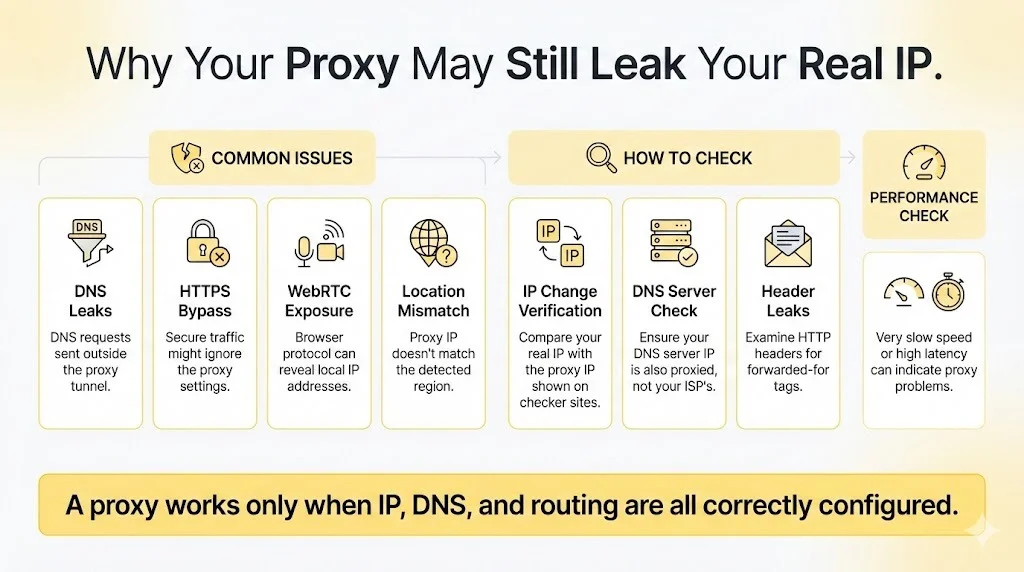
Here’s something that trips up even experienced users: a proxy setup can look completely functional while quietly leaking your real IP address to every website you visit. The settings look right, pages load fine, and there’s zero indication anything is wrong. Then you check the logs and realize your traffic was never actually routed through the proxy at all.
This happens more often than you’d think. And the worst part? Most people don’t catch it until something goes wrong.
Where Things Usually Break Down
Proxy setups fail in weird ways. Your browser might connect through the proxy just fine while your operating system sends DNS requests straight to your ISP. Or everything works for regular HTTP traffic, but HTTPS connections bypass the proxy because of how your system handles certificates.
Geographic consistency is another gotcha. You might have a proxy claiming to be in London, but the actual routing path tells a different story. Websites have gotten pretty good at spotting these mismatches. They’re looking at way more than just your IP address now.
And if you’re working with rotating proxies or large IP pools, the complexity goes up fast. Some IPs in the pool work great. Others got burned months ago and trigger CAPTCHAs immediately. Good luck figuring out which is which without proper testing.
Actually Verifying Your IP Address
The obvious first step is checking whether your IP actually changed. Hit up any IP lookup site before and after enabling the proxy. If the address doesn’t change to match your proxy’s location, something’s broken.
But that basic test misses a lot. Running your setup through IPRoyal’s reliable proxy checker tool catches problems that simple lookups won’t find. We’re talking WebRTC leaks, DNS issues, and sketchy HTTP headers that give away your real connection. These tools hit multiple potential leak points at once.
Wikipedia’s entry on proxy servers describes how proxies should work as intermediaries that completely mask your original address. When that masking is only partial, you’ve got a problem, even if the basic IP check looks clean.
Checking for DNS Leaks
DNS leaks are sneaky. Your web traffic routes through the proxy correctly, but DNS queries take the direct route to your ISP’s servers. Anyone watching can see exactly what domains you’re visiting, which defeats the whole point.
You need to verify which DNS servers are actually handling your lookups. If they belong to your local ISP instead of your proxy provider, that’s a leak. SOCKS5 proxies tend to handle this better than HTTP proxies, but configuration matters more than proxy type.
Also read: AI Humanizers
Testing Speed and Latency
A proxy shouldn’t tank your connection speed. Some slowdown is expected (you’re adding an extra hop), but anything beyond 50% additional latency points to real problems.
Research from MIT’s networking team shows how routing inefficiencies compound into serious delays. If your proxy connection crawls while your regular connection flies, something’s misconfigured. Could be server overload, bad geographic routing, or a provider that’s overselling their capacity.
Reading HTTP Headers
Your IP address is just one piece of data websites see. HTTP headers can reveal all sorts of things about your connection. Transparent proxies straight up announce themselves through X-Forwarded-For headers. Not exactly subtle.
Cloudflare’s documentation on IP geolocation shows how web infrastructure providers analyze incoming traffic for proxy signatures. Datacenter IP ranges get flagged instantly because sites maintain lists of known hosting providers. Your headers might be telling websites exactly what you’re trying to hide.
Testing Against Real Targets
Generic proxy checkers only tell part of the story. A setup that passes every verification test might still fail against your actual target websites. Different sites use different detection methods, rate limits, and blocking rules.
Test against the specific sites you’ll actually be using. Watch for CAPTCHA walls, weird redirects, or content that looks different from what regular users see. If you’re using multiple proxies from the same provider, rotate through them and see if results stay consistent.
Keeping Things Running
Proxy verification isn’t something you do once and forget about. Providers swap out IP pools, websites update their detection, and network conditions change constantly. A setup that worked perfectly last week might be completely compromised today.
Set up automated checks against your key targets. When something breaks, you want to know immediately, not three days later when you’re wondering why all your requests are failing.