
Building backlinks now involves more than just putting links everywhere you can. With so many types of backlinks available, adopting techniques that go beyond simple link placement is crucial since search engines now place a higher priority on relevancy, content value, and long-term authority. Many popular techniques often fail to deliver consistent value or take too long to show results, particularly for websites trying to gradually increase their SEO efforts.
PDF submission sites provide a smart alternative in this situation. You may provide comprehensive content and organically build backlinks by posting well-structured articles like tutorials, presentations, whitepapers, and guidelines. These pages are simple for search engines to index and crawl, increasing the visibility of your content and boosting the authority of your website with relevant links.
PDF submissions are especially effective because they integrate link development with content marketing. In this blog, we’ll look at how PDF submission sites help you create high-quality backlinks using useful, shareable resources, increase content reach, and boost SEO.
What Are PDF Submission Sites in Off-Page SEO?
One of the most popular off-page SEO strategies that allows users to post PDF files on high-authority websites to get good backlinks and enhance their online presence is called as PDF submission sites. The PDF sharing websites can be considered as good sources of backlinks since each uploaded document may contain links that lead people to your site.
In contrast to other content-sharing techniques, like posting blogs or uploading pictures, PDF submission is specific to sharing informative and downloadable files that appeal to readers and search engines. As PDFs are readily indexed by search engines, they can be found in the search results and generate organic traffic.
The most suitable content to be submitted in PDF form is research papers, brochures, case studies, eBooks, and white papers because these are rich content that contain detailed information that users can trust and rely upon. Altogether, PDF submission can be discussed as an easy but effective SEO tactic to establish authority, gain more visibility, and reach specific audiences.
Key Benefits of Using High DA PDF Submission Sites for SEO
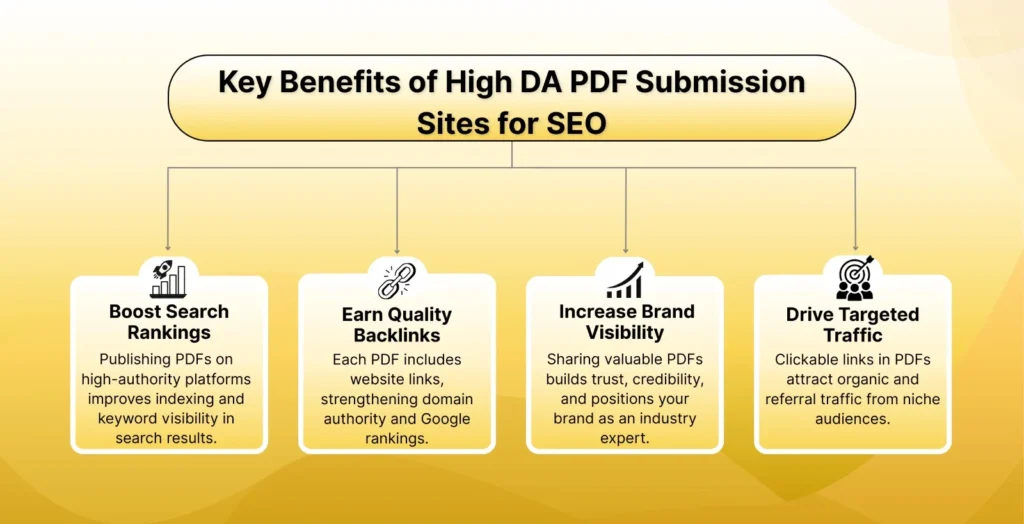
There are multiple SEO and marketing benefits of using the high DA PDF submission sites, which may significantly boost your presence online:
- Enhanced SEO Ranking: PDFs uploaded to authority domains will promote the appearance of your website in the search engine results list. Keywords in PDFs are better optimised, enabling the search engines to be better indexed and enhancing visibility.
- Quality Backlinks: Every PDF can have a link to your website, which forms great quality backlinks that enhance domain authority and increase the Google ranking.
- Better Brand Visibility: The spreading of helpful material such as guides or case studies, creates trust, connects with users and makes your brand an industry leader.
- Increase in Traffic of Web Traffic: PDFs will include clickable links that can generate organic and referral traffic, and thus allow you to reach niche audiences.
SEO Benefits of Using PDF Submission Websites
- Relevance in the Digital Market: The use of PDF submission sites is on the rise, and they are useful in assisting brands to distribute informational content and establish trust among their local customers.
- Wider Audience Reach: They help companies, enterprises, and educational institutions to access a variety of users by using downloadable and shareable PDF resources.
- Boosts Local SEO Visibility: The fact that you upload PDFs on high authority websites will enhance your local keyword positioning and brand visibility in local search results.
- Improves Off-Page search optimisation: The PDF backlinks are effective off-page messages as they enhance the domain authority and increase the organic traffic to the business sites.
- Gathers Brand Credibility on the Internet: The production of quality PDFs with original information will build your brand as a trusted and professional brand in the digital market.
- Increases Referral Traffic: Interactive links within PDF will send traffic straight to your site or areas where people can convert into customers.
- Cost-Effective Marketing Tool: The submission of PDFs is free or cheap and hence can be used in cost-effective SEO campaigns.
Effective PDF Submission Techniques to Boost SEO and Backlinks
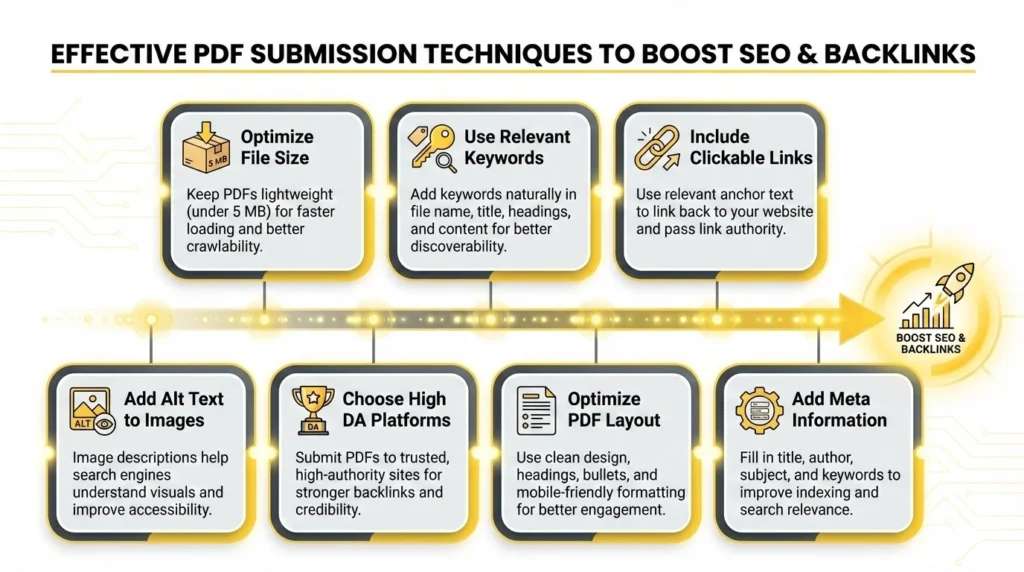
1. Optimise File Size
A lightweight PDF enhances the experience of the users and their SEO. Huge files decrease the speed of loading, bounce rates, and engagement. It is always recommended to compress your PDF but retain the visual quality. Optimal size: less than 5 MB to use Web fast. Such tools as Small PDF or Adobe Acrobat can assist you in compressing the size without losing clarity. It is important to remember that the higher the crawlability and ranking potential, the faster the loading.
2. Use Relevant Keywords
By using keywords, you will be able to make your PDF findable. It is natural to add your main and secondary keywords in the file name, title, headings and body text. e.g., do not give your file a random name but a name such as “Local-SEO-Tips-2025.pdf”. There must be no keyword stuffing, it must be a natural fit that is easy to read. Optimised keywords will enhance your opportunity of being in the PDF search results of Google.
3. Include Hyperlinks
You should always include clickable hyperlinks to your PDF format that take people to your site, blog or social media pages. Do not use generic text, use relevant anchor text (such as Learn more about Local SEO). This is not only in fuelling referral traffic but also in transferring link authority to your home. Placing links increases the level of engagement and helps Google relate your document to your central sphere.
4. Use Alt Text for Images
Description of pictures in your PDF improves search and usability by adding alt text (alternative text) to them. The search engine can not read the image and it can index the alt text to know what the image is all about. As an example, an alt tag such as SEO Keyword research infographic is used to rank your visual content. It also makes sure that your users who have a screen reader can read your content.
5. Select High DA Submission Sites
Posting your PDFs on high Domain Authority (DA) sites secures your backlink profile. Select sites with DA 40 and above that are frequently indexed and trusted by Google such as SlideShare, etc. You have a higher SEO value in high-DA links and increase your credibility of the domain. The site must always be checked to be authentic and it should be open to the public so that it can be indexed faster.
6. Optimise PDF Layout
A professional layout that is clean enhances the readability and retention of users. Easy to scan content Use headings, subheadings, bullet points and tables. Make sure that your PDF is accessible on any device and is mobile-friendly. A properly designed site will be an indicator of quality to the users and the search engines, enhancing your ranking and download capabilities.
7. Add Meta Information
Add PDF properties such as metadata such as author name, title, subject and keywords. This data is invisible and assists the search engines in locating and classifying your file. Adobe Acrobat can be used to edit metadata (File → Properties → Description tab). Correct meta info helps the indexing of your PDF and ensures your PDF appears behind the correct search terms.
List of 35+ Free PDF Submission Sites
| S.no | Free PDF Sumission | DA | SS |
|---|---|---|---|
| 1 | issuu.com | 94 | 2 |
| 2 | 4shared.com | 94 | 6 |
| 3 | wattpad.com | 92 | 1 |
| 4 | slingfile.com | 39 | 12 |
| 5 | pdf-archive.com | 68 | 4 |
| 6 | keepandshare.com | 65 | 5 |
| 7 | freepdfhosting.com | 60 | 32 |
| 8 | pdfescape.com | 62 | 3 |
| 9 | slideserve.com | 68 | 1 |
| 10 | edocr.com | 74 | 16 |
| 11 | dochub.com | 60 | 2 |
| 12 | pdfhost.net | 47 | 17 |
| 13 | pinpdf.com | 31 | 10 |
| 14 | glasscubes.com | 40 | 2 |
| 15 | en.calameo.com | 93 | 4 |
| 16 | filefactory.com | 78 | 4 |
| 17 | diigo.com | 91 | 2 |
| 18 | pearltrees.com | 84 | 33 |
| 19 | yumpu.com | 92 | 3 |
| 20 | docdroid.net | 82 | 1 |
| 21 | wepapers.com | 39 | 4 |
| 22 | turboupload.com | 54 | 0 |
| 23 | powershow.com | 57 | 15 |
| 24 | mediafire.com | 95 | 3 |
| 25 | gamefront.com | 74 | 1 |
| 26 | sharepresentation.com | 36 | 7 |
| 27 | yudu.com | 69 | 43 |
| 28 | divshare.com | 70 | 5 |
| 29 | upstore.net | 39 | 0 |
| 30 | turbobit.net | 82 | 13 |
| 31 | easyupload.io | 48 | 13 |
| 32 | filetransfer.io | 40 | 25 |
| 33 | flipsnack.com | 80 | 1 |
| 34 | uploadnow.io | 38 | 8 |
| 35 | box.com | 92 | 1 |
| 36 | uploadfiles.io | 52 | 4 |
| 37 | sendspace.com | 93 | 19 |
| 38 | slideshare.net | 94 | 3 |
| 39 | academia.edu | 93 | 1 |
List of 50+ High DA PDF Submission Sites
| S. No. | PDF Submission Sites | DA | SS |
|---|---|---|---|
| 1 | mediafire.com | 95 | 3 |
| 2 | scribd.com | 94 | 3 |
| 3 | slideshare.net | 94 | 3 |
| 4 | issuu.com | 94 | 2 |
| 5 | 4shared.com | 94 | 6 |
| 6 | sendspace.com | 93 | 19 |
| 7 | academia.edu | 93 | 1 |
| 8 | mega.nz | 93 | 28 |
| 9 | en.calameo.com | 93 | 4 |
| 10 | depositfiles.com | 92 | 16 |
| 11 | box.com | 92 | 1 |
| 12 | wattpad.com | 92 | 1 |
| 13 | yumpu.com | 92 | 3 |
| 14 | diigo.com | 91 | 2 |
| 15 | Speakerdeck.com | 85 | 1 |
| 16 | pearltrees.com | 84 | 33 |
| 17 | www.turbobit.net | 82 | 13 |
| 18 | docdroid.net | 82 | 1 |
| 19 | flipsnack.com | 80 | 1 |
| 20 | emaze.com | 79 | 3 |
| 21 | filefactory.com | 78 | 4 |
| 22 | edocr.com | 74 | 16 |
| 23 | gamefront.com | 74 | 1 |
| 24 | divshare.com | 70 | 5 |
| 25 | yudu.com | 69 | 43 |
| 26 | joomag.com | 69 | 2 |
| 27 | pdf-archive.com | 68 | 4 |
| 28 | slideserve.com | 68 | 1 |
| 29 | keepandshare.com | 65 | 5 |
| 30 | pdfescape.com | 62 | 3 |
| 31 | mirrored.to | 61 | 4 |
| 32 | freepdfhosting.com | 60 | 32 |
| 33 | dochub.com | 60 | 2 |
| 34 | powershow.com | 57 | 15 |
| 35 | turboupload.com | 54 | 0 |
| 36 | transferbigfiles.com | 53 | 4 |
| 37 | docshare.tips | 52 | 35 |
| 38 | uploadfiles.io | 52 | 4 |
| 39 | 4sync.com | 52 | 9 |
| 40 | easyupload.io | 48 | 13 |
| 41 | pdfhost.net | 47 | 17 |
| 42 | presentationpro.com | 46 | 1 |
| 43 | transferxl.com | 43 | 6 |
| 44 | zentation.com | 40 | 15 |
| 45 | slideonline.com | 40 | 3 |
| 46 | filetransfer.io | 40 | 25 |
| 47 | glasscubes.com | 40 | 2 |
| 48 | upstore.net | 39 | 0 |
| 49 | slingfile.com | 39 | 12 |
| 50 | wepapers.com | 39 | 4 |
| 51 | uploadnow.io | 38 | 8 |
| 52 | leokrut.com | 38 | 11 |
| 53 | sharepresentation.com | 36 | 7 |
| 54 | pinpdf.com | 31 | 10 |
| 55 | Keep2share.com | 12 | 0 |
Building SEO-Optimized PDFs to Improve Visibility and Traffic
1. Naming PDFs Strategically
The name of your PDF is also a major contributor to SEO ranking. Always give it a brief, keyword-filled name that describes what it is about as much as possible, e.g. digital-marketing-trends-2025.pdf as opposed to final-doc1.pdf. Search engines interpret document relevancy based on the filenames of the document, thus providing target keywords will make your PDF be seen on related search queries. Do not use special characters or spaces preferably hyphens are used to enhance indexing and reading.
2. Include Descriptive Headings and Titles
A properly designed PDF must have well-defined titles (H1) and subheadings (H2, H3), which have the keywords integrated within them. This hierarchy enhances ease of reading among the users and ease of crawling search engines. The titles need to be descriptive of the main topic and the headings must logically subdivide the content. Formatting correctly sends an indication to search engines that your PDF is well structured and thus it easily ranks on various keyword variations.
3. Provide External and Internal Links.
Internal (to your own web pages or blogs) and External (to trusted sources) links are the most effective way to build your SEO strategy. Internal links bring back traffic to your site whereas external links create credibility and context. The descriptive anchor text (such as Learn more about SEO trends) should be used rather than generic ones. Placing links also renders your PDF interactive, useful and more interesting to the readers and search engines.
4. Optimise for Mobile Devices
Due to the majority of users accessing content via smartphones, make sure that your PDF is mobile-friendly. Have a responsive design, legible font sizes and less scrolling. Do not have big picture images that do not look good on a small screen. Check your PDF on various platforms so that formatting is maintained. Mobile-optimised PDF will enhance user experience, engagement rates and the overall performance of the SEO process because Google is ranking mobile-friendly documents highly.
5. Compress PDFs
The huge file sizes make the loading process slow, which is detrimental to the search engine optimization and user experience. To save on space without reducing the visual quality of your PDF, compress your documents with such tools as Small PDF, iLove PDF or Adobe Acrobat. Strive to make a file less than 5 MB to view it easily and index it quickly. The speed of loading of the PDF improves its accessibility, lowers bounce rates, and enhances the visibility of the search engine results in the search engines, which need to be optimised.
Other Submission Sites
- Classified Submission Sites
- Directory Submission Sites
- Profile Creation Sites
- Ping Submission Sites
- Article Submission Sites
- Guest Posting Sites
- Image Submission Sites
- Web 2.0 Submission Sites
- Forum Submission Sites
A Step-by-Step Guide to PDF Submission for Better SEO
- Plan Content: Choose your intentions and intended audience (leads, traffic, or branding). Select an effective theme and design such as guides, checklists or case studies.
- Optimise PDF: Make use of clear layout, keywords and clickable links. Make files not big (less than 10 MB) and give them keywords as names (e.g. Local-SEO-Guide.pdf). Add such meta-data as title and description.
- Choose Sites: Select great DA and other appropriate sites (SlideShare, Academia.edu). Verify check file options before uploading.
- Add Details: Write a title that becomes SEO-friendly, a 2-3 line description, keywords/tags and choose the right category. Post a good profile picture.
- Submit PDF: Register an account, post your file, complete all the fields and publish. Add the UTM tracking link of your website or landing page.
- Promote PDF: Post the link in social media and email newsletters and your website/blog to increase visibility.
- Track Performance: Google Analytics or platform statistics will verify the number of downloads, clicks and referral traffic.
- Update Regularly: Check and update your PDF after every few months using new information and working links.
Common Mistakes to Avoid in PDF Submission
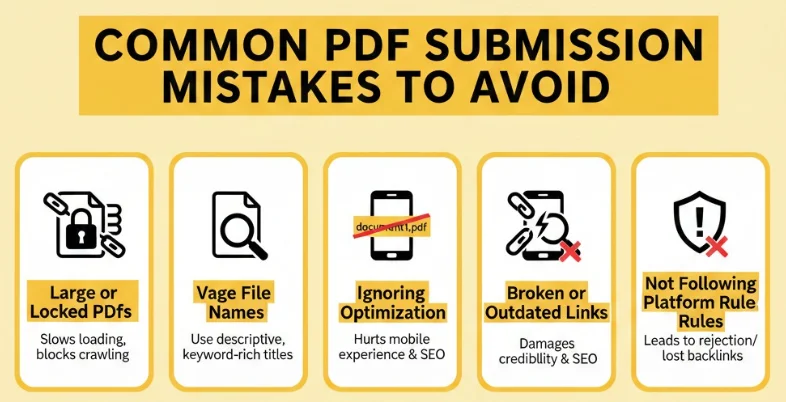
- Large or Password-Protected PDFs: It does not support the uploading of large or password-protected PDFs. Huge amounts of PDFs and those that are locked are slow to load and prevent crawling by search engines, which reduces their SEO visibility.
- Ambiguous or Non-specific File names: Naming such as document1.pdf, which is a vague name, is damaging to ranking – always use the keywords in the title of the file.
- Overlooking Mobile Optimisation: Unoptimized PDFs are a source of bad mobile user experience and decrease search results in smartphones.
- Bad Links or Obsolete Material: Busted or outdated links within the PDFs decrease credibility and search engine ranking, revise regularly.
- Failure to Adhere to Submission Site Rules: Violation of the guidelines of the platform can lead to rejection or deletion, which influences the quality of the backlinks and their visibility.
Proven PDF SEO Tips for Maximum Visibility
- Add Interactive Features such as Tables of Contents which are clickable. Increasing the user engagement, navigation, and time spent on your PDF, and adding clickable tables of contents enhances the value of SEO.
- Add Videos or Links to Landing Pages. The incorporation of videos or landing page links would enhance the engagement, and generate specific traffic to your site to make more conversions.
- Control PDF Performance by way of Analytics or Tracking URLs. Track the downloads, clicks and traffic sources using UTM links or analytics to help you tell the truth about the impact of SEO.
- Publish PDFs on a regular basis in order to keep the content updated and relevant. Updating your PDFs with new information, links, and graphics allows you to keep the ranking power and provide search engines with an indication of active content.
Conclusion
PDF Submission Sites are now an affordable and effective SEO tool to increase online presence. Uploading optimized PDFs on high Domain Authority (DA) sites through these platforms can maximize website authority, brand recognition, and organic traffic. Properly created PDFs become long-term SEO assets, continuing to generate leads and backlinks when crafted with the right keywords, links, and metadata.
Businesses can further enhance their ranking potential by following best practices, such as reducing file sizes, making PDFs mobile-friendly, and regularly updating content. Beyond SEO, PDFs can also serve as a professional portfolio, a marketing tool, and a lead-generation resource, helping brands build credibility and connect effectively with their target audience.
FAQs
1. What is PDF Submission in SEO?
It consists of uploading optimised PDFs to high-DA websites to gain backlinks and enhance search visibility.
2. What is the Benefit of Submitting a PDF?
It leads to organic traffic, it enhances domain authority and better rankings of the keywords due to quality backlinks.
3. What is the Best Content to Submit Through PDF?
Guides, reports, case studies, and checklists containing useful and keyword-rich information are the most effective.
4. Which Frequency of the PDF Updates Should They Have?
Revise after every 6-12 months to ensure information is up-to-date and the site does not lose its place in the search system.
5. Does Google Render PDFs Crawlable?
In case the PDF is not encrypted with a password and is open, Google is able to crawl and index the links within it.