
Choosing the right video editing software can make a big difference in your workflow. Invideo Editor and Adobe Premiere Pro take different approaches to editing, so this guide compares their features, pricing, ease of use, and overall workflow to help you understand which one fits your needs.
Comparing Invideo Editor vs Adobe Premiere Pro
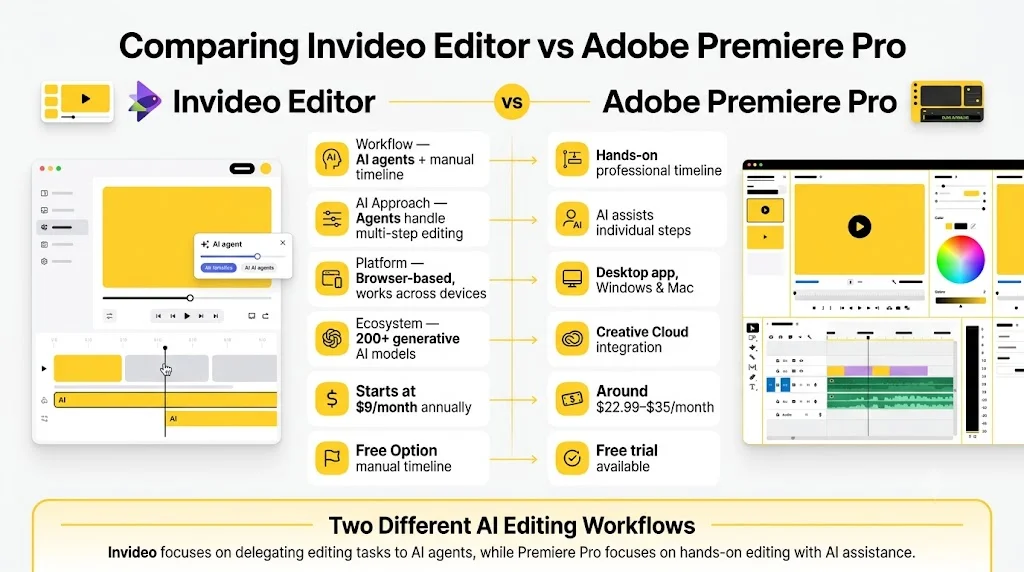
| Invideo Editor | Adobe Premiere Pro | |
|---|---|---|
| Workflow | A real timeline with AI agents you can direct to do editing work, or edit entirely by hand | A familiar, fast manual timeline built for hands-on editing from the first cut |
| AI Approach | Agentic — agents execute multi-step goals like assembly, restructuring, and dubbing | Assistive — AI speeds up individual steps like transcription and speech enhancement |
| Platform | Runs entirely in the browser, any device | Native desktop application, Windows and Mac |
| Ecosystem | Standalone, with 200+ generative models built in | Deep integration with After Effects, Audition, and Creative Cloud |
| Pricing | Basic $9/Pro $25/Ultra $60 per seat/month, billed annually | Roughly $22.99–35/month depending on plan |
| Free Option | Manual timeline free to use | Free trial only |
An video editor choosing between these two is really choosing between two different working relationships with AI. Premiere Pro keeps a person driving every decision and uses AI to remove friction from specific steps along the way. Invideo Editor lets a person hand off an entire task, describe the goal, and let an agent execute it, while keeping full manual control available on the same project.
This guide breaks down workflow, color, audio, AI, and pricing to help you decide which relationship actually fits how you work.
1. What Each Editor Is Built Around
Adobe Premiere Pro
Premiere Pro has spent decades becoming the default choice for agencies, YouTube production, and creative studios, particularly anyone already inside the Adobe Creative Cloud ecosystem. Its AI additions, Generative Extend, Enhance Speech, text-based editing, are genuinely useful, but they accelerate a manual process rather than replacing it.
Invideo Editor
Invideo Editor lets you edit video with AI by handing an entire editorial task to an agent: describe a cut, and it reviews raw footage, selects the cleanest takes, and assembles a working sequence, or point it at a reference edit and have it match that style across your own footage. Every result lands on a real, professional timeline that stays fully editable by hand.
2. Editing Workflow
Adobe Premiere Pro
Premiere’s manual timeline is fast and familiar to most editors, well-suited to hands-on cutting from the very first frame, especially in agency and social-content workflows where an editor is doing the work directly.
Invideo Editor
Rather than starting from an empty timeline, Invideo Editor can start from a folder of raw, unsorted footage: describe the intended structure, and an agent logs takes, removes filler and dead air, and assembles a base cut before manual editing begins, with the full manual toolset still there underneath.
Winner: Depends on the starting point. Premiere suits an editor doing the cutting themselves from the first frame. Invideo Editor suits a project starting from raw footage that benefits from an automatic first pass.
3. Color Grading
Adobe Premiere Pro
Lumetri Color handles most editorial grading needs directly in the timeline, and the newer Color Mode speeds up in-timeline adjustments for editors who don’t want to leave Premiere for color work.
Invideo Editor
The grading suite on Invideo Editor, wheels, tone curves, hue and saturation curves, qualifiers, LUTs, a waveform scope, can be operated manually or directed to an agent: describe a look, or point to a reference, and the grade gets applied across the project.
Winner: Close. Premiere’s tools are fast for manual grading; Invideo Editor adds the option to direct the grade instead of applying it by hand shot by shot.
4. Audio Tools
Adobe Premiere Pro
Deeper audio work typically routes to Adobe Audition, a separate application, though the Essential Sound panel handles basic dialogue, music, and effects tagging directly inside Premiere.
Invideo Editor
The built-in audio workstation on Invideo Editor, separate tracks for voice, music, and effects, routed through buses with per-track effects and loudness metering, lives in the same project, and an agent can be directed to clean up dialogue and balance a mix without leaving the timeline.
Winner: Invideo Editor — genuine mixing depth without needing a separate application for anything beyond basic tagging.
5. AI Capabilities
Premiere’s AI accelerates specific steps: Enhance Speech cleans dialogue, Generative Extend fills a few extra frames, auto-transcription speeds up captioning. An editor still builds the structure and makes each call.
The agents inside Invideo Editor execute broader, multi-step goals from one instruction: assemble a base cut, sync multicam angles, restructure pacing to a target length, or dub a project into another language while preserving lip sync, all from the same understanding of the project.
Winner: Different models entirely. Premiere speeds up a manual editor’s individual steps. Invideo Editor lets an editor delegate whole tasks, assembly, restructuring, dubbing, that Premiere has no direct equivalent for.
6. Generative Media
Premiere connects to Adobe Firefly for generative work, credit-limited and separate from the core edit.
Invideo Editor has 200+ generative models available directly inside the project, so a missing shot or a needed voiceover can be generated and dropped onto the timeline as an editable clip, no separate tool required.
Winner: Invideo Editor — generative media lives inside the same editing surface.
7. Pricing
Adobe Premiere Pro: free trial only, then roughly $22.99–35/month depending on plan, no ongoing free tier.
Invideo Editor: the manual timeline is free to use even if you never assign a single task to an agent. Full agent access requires a paid plan: Basic $9/Pro $25/Ultra $60 per seat/month, billed annually.
Winner: Invideo Editor for anyone who wants to edit manually at no cost; Premiere’s flat subscription becomes comparable once full agent access is factored in at the higher tiers on invideo Editor.
8. Which One Should You Choose?
Choose Adobe Premiere Pro if you:
- Already work inside the Adobe ecosystem, especially with After Effects
- Want the most familiar, industry-standard manual timeline
- Prefer editing hands-on from the first frame every time
Choose Invideo Editor if you:
- Start from raw, unsorted footage and want an automatic first assembly
- Want to delegate a whole task, not just speed up individual steps
- Need dubbing or reference-matching without a separate tool
- Want a genuinely free manual timeline with agent access available when needed
Final Verdict
Premiere Pro asks an editor to drive every decision, with AI speeding up specific steps along the way. Invideo Editor asks an editor to direct a set of agents capable of executing whole tasks, while keeping a full manual editor available on the same project for anyone who wants to work by hand instead.
For agency and Adobe-ecosystem work built around hands-on manual editing, Premiere Pro remains the familiar standard. For a project starting from raw footage that benefits from agentic assembly, restructuring, or dubbing, Invideo Editor is built specifically for that job.
Frequently Asked Questions
Is Invideo Editor A Real Alternative To Adobe Premiere Pro?
For assembly, everyday grading, audio, and dubbing work, yes. For deep After Effects integration and established Adobe pipelines, Premiere Pro remains the more direct fit.
Which Is Cheaper, Invideo Editor Or Adobe Premiere Pro?
The manual timeline on Invideo Editor is free to use even if you never assign a task to an agent. Premiere Pro has no ongoing free tier beyond a trial, running roughly $22.99–35/month.
Can The Agents Inside Invideo Editor Replace Manual Editing Entirely?
Not entirely, and they’re not meant to. Every agent result lands on a real, editable timeline, so a person can review, adjust, or override any of it by hand.
Does Invideo Editor Require Adobe Software To Work?
No. It’s a standalone, browser-based product with no dependency on Premiere or any other Adobe application.