
Thinking about starting a YouTube channel but not sure where to begin? You’re not alone. Every day, thousands of aspiring creators wonder whether YouTube is still worth it, what content they should create, and how they can stand out in such a competitive space. Whether you want to share your knowledge, build a personal brand, grow your business, or earn an online income, YouTube offers endless opportunities for creators who are willing to learn and stay consistent.
Success on YouTube isn’t about having expensive equipment or millions of subscribers from day one, it’s about creating valuable content that solves problems, entertains viewers, or inspires people to keep coming back. In this complete guide, you’ll learn exactly how to start a YouTube channel, from choosing the right niche and creating engaging videos to growing your audience and monetizing your content with confidence.
Why Start a YouTube Channel in 2026?
YouTube is more than just a video-sharing platform, it’s one of the best places to build your personal brand, grow a business, share your expertise, and even create multiple income streams. Every day, millions of people visit YouTube to learn new skills, solve problems, compare products, or simply find entertaining content. This means your audience is already there, you just need to create content that genuinely helps or engages them.
The best part is that you don’t need expensive cameras, professional editing skills, or thousands of followers to get started. A smartphone, a clear idea, and consistency are enough to begin your journey. Unlike many social media platforms where posts disappear within a day, YouTube videos can continue attracting views through search results and recommendations for months or even years, making every quality video a long-term asset.
As you gain experience, your confidence, content quality, and audience will naturally grow. YouTube also opens doors to monetization through ads, affiliate marketing, sponsorships, memberships, digital products, and much more. So, instead of waiting for the perfect moment, start today, keep learning from every upload, and focus on delivering value. Every successful creator once uploaded their very first video, and your journey can begin with the next one you publish.
Step-by-Step Process to Start a YouTube Channel in 2026
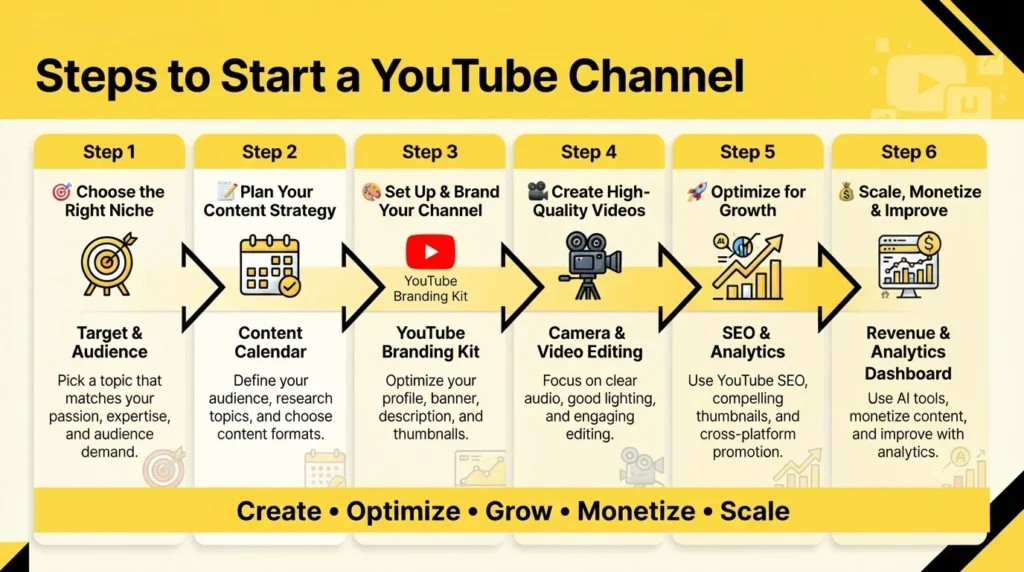
Starting a YouTube channel may seem overwhelming at first, but it becomes much easier when you follow the right process. Instead of trying to do everything at once, focus on one step at a time. From choosing the right niche to creating valuable content and growing your audience, every step plays an important role in building a successful channel. Let’s begin with the most important decision you’ll make choosing your YouTube niche.
Step 1: Choose Your YouTube Niche
Your niche is the foundation of your YouTube channel. It tells viewers what your content is about and helps YouTube understand who should see your videos. Rather than creating videos on random topics, focus on one specific area where you can consistently provide value. A clear niche makes it easier to attract the right audience, build trust, and grow your subscribers over time. Remember, people subscribe because they know what kind of content they can expect from your channel.
Popular YouTube Niches in 2026 With Growth Potential
Choosing a growing niche gives your channel a better chance of reaching the right audience. Viewers are actively searching for practical, educational, and solution-based content. Some of the fastest-growing niches include AI tutorials, personal finance, health and wellness, sustainable living, digital skills, productivity, and career guidance. The key isn’t just following trends, it’s choosing a topic you can consistently create content around while offering your own unique perspective.
Niche Selection Formula
If you’re confused about which niche to choose, use the simple 3-Circle Method. Imagine three overlapping circles.
- Passion: What do you genuinely enjoy talking about or doing?
- Expertise: What skills, knowledge, or experience do you already have?
- Demand: What topics are people actively searching for on YouTube?
Your ideal niche is where all three circles meet. When you create content you enjoy, understand well, and people actually want to watch, staying consistent becomes much easier and your channel has a much better chance of growing.
How to Validate Your Niche Before You Start
Before starting, check if your niche has enough demand:
- Use YouTube Autocomplete to discover popular search queries.
- Check Google Trends to measure interest over time.
- Study successful competitors and identify content gaps.
- Use tools like VidIQ or TubeBuddy for keyword research.
- Profitable Niche Ideas for Indian Creators
Popular choices include finance in Hindi, regional tech reviews, government exam preparation, cooking recipes, digital marketing tutorials, and real estate advice. Choose a niche that offers long-term value, stays relevant, and allows you to publish helpful content consistently.
Step 2: Plan Your Content Strategy
Growing a YouTube channel requires more than uploading random videos. A clear content strategy helps you stay consistent, create valuable content, and attract the right audience. Before creating videos, understand who your viewers are, what they want to learn, and how your content can solve their problems.
Define Your Target Audience
Identify your ideal viewer by considering their age, interests, challenges, and viewing habits. Knowing your audience helps you choose relevant topics, the right video style, and suitable language.
Content Types for YouTube
Choosing the right content format is just as important as choosing the right niche. Mixing different video types keeps your audience engaged and helps you reach more viewers. Educational, practical, and authentic content continues to perform best.
- Tutorials & How-To Videos: Solve problems with step-by-step guidance.
- Product Reviews & Comparisons: Help viewers make informed buying decisions.
- Educational & Explainer Videos: Simplify complex topics.
- Vlogs & Behind-the-Scenes: Build a stronger connection with your audience.
- AI-Assisted Content: Use AI for ideas, scripts, and editing while adding your own expertise.
- YouTube Shorts: Create quick, engaging videos to increase reach and attract new viewers.
YouTube Shorts vs Long-Form Videos
Instead of choosing between Shorts and long-form videos, use both strategically. YouTube Shorts are great for reaching new audiences and increasing visibility, while long-form videos build trust, improve watch time, and offer better monetisation opportunities. Combining both formats is the best strategy for sustainable channel growth.
| Factor | YouTube Shorts | Long-Form Videos |
| Duration | Under 60 seconds | 8–20 minutes (ideal) |
| Discovery | Shorts shelf & algorithm recommendations | Search results & suggested videos |
| Monetisation | Lower RPM | Higher RPM |
| Subscriber Conversion | Lower | Higher |
| Evergreen Value | Low | High |
| Best For | Brand awareness & reach | Authority building & income |
| 2026 Strategy | Attract new viewers | Build trust, SEO & long-term growth |
Keyword and Topic Research
Great YouTube videos begin with great topic research. Instead of guessing what people want to watch, use keyword research tools to discover topics that already have demand. This helps your videos appear in search results and reach the right audience.
| Tool | Use | Cost |
| TubeBuddy | Keyword research, tags, SEO scores | Free + Paid |
| VidIQ | Competitor analysis, trending topics | Free + Paid |
| Google Trends | Compare topic popularity over time | Free |
| YouTube Autocomplete | Discover real user search queries | Free |
| Ahrefs / SEMrush | YouTube keyword volume & competition | Paid |
| ChatGPT / Gemini | Generate video ideas, outlines & titles | Free + Paid |
Step 3: Set Up Your YouTube Channel
Once you’ve chosen your niche and planned your content, it’s time to set up your YouTube channel. A well-optimised channel creates a strong first impression, helps viewers understand your content, and makes your channel look more professional. Think of it as your digital storefront, an organised and attractive channel encourages visitors to subscribe and explore more of your videos.
Create Your YouTube Channel
Start by signing in with your Google account and selecting “Create a Channel.” Choose a channel name that matches your niche, upload a clear profile picture, design an eye-catching banner, and write a keyword-rich channel description. These elements help viewers quickly understand what your channel offers.
If you plan to grow your channel professionally or work with a team, consider creating a Brand Account instead of a Personal Account. A Brand Account offers more flexibility, allowing multiple people to manage the channel without sharing your personal Google account.
YouTube Channel Settings You Must Configure
After creating your channel, configure a few important settings to improve your channel’s appearance and help YouTube understand your content.
- Add Channel Keywords: Include niche-related keywords to improve discoverability.
- Set Upload Defaults: Save your preferred category, language, and description template for consistent uploads.
- Organise Your Homepage: Feature playlists, popular uploads, and recent videos for easy navigation.
- Add a Channel Trailer: Introduce new visitors to your channel and encourage them to subscribe.
- Enable a Video Watermark: Display a subscribe button on every video to increase subscriptions.
These simple settings make your channel look more professional and save time when publishing videos.
Optimise Your About Section for YouTube SEO
Your About section helps both viewers and YouTube understand what your channel is about. Start with your primary keyword, briefly explain the type of content you create, who it’s for, and why people should subscribe. Write naturally and avoid overusing keywords.
Example: “Tech Master helps beginners choose the best smartphones, laptops, and gadgets through honest reviews, buying guides, and practical tech tips. New videos every week.”
Step 4: Brand Your YouTube Channel
Strong branding helps your channel stand out and makes it easier for viewers to recognise your content. A consistent profile picture, banner, thumbnails, and colour scheme create a professional image, build trust, and encourage people to subscribe. The more recognisable your brand is, the more likely viewers are to remember and return to your channel.
Branding Essentials Checklist
Before publishing your first video, make sure these key branding elements are ready:
| Branding Element | Recommended Size | Suggested Tool |
| Profile Picture | 800 × 800 px | Canva, Adobe Express |
| Channel Banner | 2560 × 1440 px | Canva |
| Video Thumbnail | 1280 × 720 px | Canva, Photoshop |
| Intro/Outro | 5–10 seconds | CapCut, Canva |
| Colour Palette | 2–3 colours | Coolors.co |
Branding Tips:
- Use a clear and memorable profile picture.
- Design a clean banner that reflects your niche.
- Keep the same fonts and colours across all thumbnails.
- Make intros and outros short and engaging.
- Stick to 2–3 brand colours for a professional look.
Create Click-Worthy Thumbnails
Your thumbnail is the first thing viewers notice, so it plays a major role in getting clicks. Keep your design simple, eye-catching, and relevant to your video. A strong thumbnail can significantly improve your click-through rate (CTR).
Tips for Better Thumbnails:
- Use expressive faces whenever possible.
- Keep text short (3–5 words) and easy to read.
- Choose bright, contrasting colours.
- Maintain a consistent thumbnail style.
- Create curiosity without using misleading clickbait.
Best Free Thumbnail Tools
| Tool | Best For |
| Canva | Ready-made templates and beginner-friendly editing |
| Adobe Express | Quick professional designs |
| Photoshop | Advanced custom thumbnail editing |
Well-designed branding and thumbnails make your channel look more professional, improve recognition, and increase the chances of viewers clicking on your videos.
Step 5: Get the Right Equipment
Many beginners think they need expensive cameras and a professional studio before starting a YouTube channel. In reality, that’s not necessary. Most successful creators begin with a smartphone and gradually upgrade as their channel grows. Viewers care more about valuable content, clear audio, and consistency than expensive gear. Start with the equipment you already have and invest in better tools only when your content and audience grow.
YouTube Starter Equipment:
Choose your equipment according to your budget and current stage of content creation.
| Setup Level | Recommended Equipment | Approximate Cost (India) |
| Beginner (Phone) | Smartphone + CapCut | ₹0 extra |
| Basic Upgrade | Lavalier Microphone + Ring Light + Tripod | ₹2,000–₹5,000 |
| Intermediate | DSLR/Mirrorless Camera + USB Microphone + Softbox | ₹20,000–₹50,000 |
| Professional | Complete Studio Setup | ₹1,00,000+ |
Key Tips for Beginners
- Start with your smartphone before buying expensive equipment.
- Publish your first 10–20 videos before upgrading your setup.
- Invest in a good microphone first, as audio quality matters more than video quality.
- Upgrade gradually as your channel and production needs grow.
Home Studio Setup on a Budget
You don’t need a dedicated studio to create professional-looking videos. A simple, well-organised recording space can deliver excellent results.
Improve Your Audio:
- Record in a quiet room and reduce echo using curtains, rugs, or cushions.
- Turn off fans and other noisy appliances while filming.
Use Lighting Effectively:
- Record facing a window to make the most of natural light.
- If needed, use a ring light or softbox for even lighting.
Create a Clean Background:
- Choose a tidy wall, bookshelf, or workspace.
- Keep decorations minimal so the focus stays on you.
Reduce Background Noise:
- Close doors and windows before recording.
- Use a lavalier or USB microphone for clearer voice recordings.
A clean background, good lighting, and clear audio will have a much bigger impact on your videos than expensive equipment. Focus on creating valuable content first, then improve your setup as your YouTube channel grows.
Step 6: Film and Edit Your Videos
Creating great YouTube videos isn’t about using expensive equipment, it’s about delivering valuable content in an engaging way. Don’t worry if your first few videos aren’t perfect. Every creator improves with practice. Focus on clear recording, smooth editing using a reliable video editing platform, and providing value to your audience.
Filming Tips for Better Videos
Good filming helps keep viewers engaged and makes your videos look more professional.
- Accept Imperfection: Treat your first few videos as learning experiences.
- Look at the Camera Lens: It creates better eye contact with viewers.
- Use a Teleprompter: Apps like PromptSmart can help you deliver your script naturally.
- Follow the 3-Second Rule: Pause before and after each take for easier editing.
- Record in a Quiet Place: Clear audio improves viewer experience.
- Keep the Camera Stable: Use a tripod or stable surface to avoid shaky footage.
Video Editing for Better Retention
Editing removes distractions and keeps viewers watching until the end.
Recommended Editing Tools
| Tool | Best For | Cost |
| CapCut | Beginners | Free |
| DaVinci Resolve | Professional Editing | Free |
| Adobe Premiere Pro | Advanced Editing | ₹1,800/month |
| iMovie | Mac Users | Free |
| Descript | AI Editing | Paid |
Editing Best Practices:
- Remove unnecessary pauses and mistakes.
- Add subtitles for better accessibility.
- Use B-roll, screenshots, or graphics where needed.
- Keep transitions simple and use background music at a low volume.
Hook Strategy: The First 30 Seconds Matter
The opening of your video decides whether viewers stay or leave. Get straight to the point using the Problem, Promise, Proof method.
- Problem: Identify the viewer’s challenge.
- Promise: Explain what they’ll learn.
- Proof: Build trust with your experience or results.
- Avoid: Long intros, logo animations, or spending too much time introducing yourself before providing value.
Step 7: YouTube SEO: Get Your Videos Found
Creating a great video is only the first step. To get more views, people need to find your content. YouTube SEO helps your videos appear in search results, suggested videos, and recommendations by optimising your titles, descriptions, keywords, and playlists. Better SEO can lead to more views, subscribers, and long-term channel growth.
What Is YouTube SEO and Why Does It Matter?
YouTube SEO is the process of optimising your video’s title, description, tags, and other elements so YouTube understands your content and recommends it to the right audience. Since YouTube is a search engine, good SEO increases your chances of being discovered by people searching for your topic.
How to Write an SEO-Optimised Video Title
Your title is one of the most important ranking factors. It should clearly describe your video while encouraging viewers to click.
Best Practices
- Place your primary keyword near the beginning.
- Keep titles between 60–70 characters.
- Add a benefit, number, or hook to increase clicks.
- Avoid misleading clickbait.
SEO-Friendly Title Formula
Primary Keyword + Benefit/Number/Hook + Year
Example
| Weak Title | SEO-Optimised Title |
| My YouTube Journey | How to Start a YouTube Channel in 2026 – 10 Steps for Beginners |
How to Write Video Descriptions That Rank
A good description helps both YouTube and viewers understand your video.
Description Structure
- Lines 1–2: Include your primary keyword naturally.
- Lines 3–5: Explain what viewers will learn.
- Add timestamps, useful links, and 3–5 relevant hashtags.
Example: “Learn how to start a YouTube channel in 2026, choose the right niche, optimise your videos, and grow your audience with beginner-friendly tips.”
Step 8: Understand the YouTube Algorithm
Many beginners think the YouTube algorithm only promotes big creators, but that’s not true. Its main goal is to recommend videos that viewers enjoy. If your content keeps people watching and engaged, YouTube is more likely to recommend it, even if your channel is new. Focus on creating valuable, viewer-friendly content instead of trying to “hack” the algorithm.
How the YouTube Algorithm Works in 2026
YouTube uses AI to understand your videos and recommend them to the right audience. It looks at factors like your title, thumbnail, watch time, and engagement. Viewer satisfaction and retention matter more than just views, making quality content the key to growth.
Key YouTube Algorithm Signals
| Signal | What It Measures | How to Optimise It |
| Click-Through Rate (CTR) | How attractive your title and thumbnail are | Create eye-catching thumbnails and clear titles |
| Watch Time & Retention | How long viewers watch | Start with a strong hook and keep videos engaging |
| Engagement | Likes, comments, shares, subscriptions | Encourage interaction and reply to comments |
| Session Time | Whether viewers continue watching | Use playlists, end screens, and related videos |
Stronger engagement signals increase your chances of appearing in search results and recommendations.
2026 Algorithm Trends: What Changed?
- Long-Form Content Is Growing: Tutorials, educational videos, and storytelling content perform well because they increase watch time.
- Original Content Matters: AI tools can help, but YouTube rewards creators who add their own knowledge and insights.
- Viewer Satisfaction Over Views: Watch time, retention, and engagement now matter more than total views.
How to Beat the Algorithm as a New Channel
You don’t need thousands of subscribers to grow. Follow these simple practices:
- Create Search-Friendly Content: Target topics people are already searching for.
- Stay Consistent: Focus on one niche during your first 10–15 videos.
- Upload Regularly: A consistent schedule helps both viewers and the algorithm.
- Reply to Comments: Early engagement builds community and sends positive signals.
- Keep Improving: Make each video better than the last by improving your hooks, thumbnails, and editing.
Understanding how the algorithm works helps you create videos that people enjoy watching. Consistently publishing valuable content is the best way to grow your YouTube channel over time.
Step 9: Grow Your YouTube Channel:
Reaching your first 1,000 subscribers takes time, consistency, and patience. Instead of chasing viral videos, focus on creating valuable content, promoting it effectively, and building trust with your audience. Small improvements with every upload lead to steady long-term growth.
Promote Your Videos with a Multi-Channel Strategy
- Publishing a video is only the beginning. Sharing your content across different platforms helps you reach more viewers.
Effective Promotion Strategies
- Use End Screens and Playlists: Keep viewers watching related videos.
- Share on WhatsApp and Telegram: Promote your videos in relevant groups without spamming.
- Create YouTube Shorts: Use short clips to drive viewers to your full videos.
- Post on Social Media: Share highlights on Instagram, Facebook, LinkedIn, or X to increase reach.
How to Get Your First 100 Subscribers
The first 100 subscribers are the toughest, so focus on building awareness and trust.
- Share your channel with friends, family, and colleagues.
- Upload at least 3 quality videos before promoting your channel.
- Engage with creators and viewers in your niche through meaningful comments.
- Repurpose your videos into Shorts or social media clips.
- Ask viewers to subscribe if they found your content helpful.
Step 10: AI Tools for YouTube Creators in 2026
AI has become a valuable tool for YouTube creators, helping with content planning, script writing, editing, and SEO. While AI can save time, it should support your creativity rather than replace it. The most successful creators combine AI with their own knowledge, personality, and experience to create original content.
How AI Is Changing YouTube Content Creation
AI helps speed up many parts of the content creation process, allowing creators to focus more on producing valuable videos.
Ways AI Can Help
- Script Writing: Generate video ideas, outlines, and first drafts.
- Topic Research: Discover trending topics and audience questions.
- Thumbnail Ideas: Create engaging thumbnail concepts and text.
- YouTube SEO: Find keywords and optimise titles and descriptions.
- Captions: Generate subtitles and transcriptions automatically.
Always review and personalise AI-generated content to keep it accurate and authentic.
Best AI Tools for YouTubers in 2026
| AI Tool | Best Use | Cost |
| ChatGPT / Gemini | Scripts, ideas, outlines | Free + Paid |
| VidIQ AI | Keywords, titles, YouTube SEO | Free + Paid |
| Descript | AI video editing | Paid |
| Canva AI | Thumbnails and graphics | Free + Paid |
| ElevenLabs | AI voiceovers | Paid |
| Otter.ai | Transcriptions and captions | Free + Paid |
| TubeMagic | Content planning | Paid |
Step 11: Monetize Your YouTube Channel
Monetisation is an exciting milestone, but it should come after building a loyal audience. Focus on creating valuable content consistently and earning your viewers’ trust. As your channel grows, you can generate income through multiple sources instead of relying only on ad revenue.
YouTube Partner Program (YPP)
The YouTube Partner Program (YPP) allows creators to earn through ads and access additional monetisation features.
Standard YouTube Partner Program (Ad Revenue)
To qualify for full monetisation, you generally need:
- 1,000 subscribers
- 4,000 public watch hours in the last 12 months or
- 10 million Shorts views in the last 90 days
- Early Access to YPP (Limited Monetisation)
Some monetisation features are available earlier if you have:
- 500 subscribers
- 3 public uploads in the last 90 days
- 3,000 public watch hours in the last 12 months or
- 3 million Shorts views in the last 90 days
- Multiple Income Streams for YouTubers
Growing creators shouldn’t depend only on AdSense. Diversifying your income creates a more stable business.
YouTube RPM in India
Your earnings depend on your niche, audience, and advertiser demand. RPM (Revenue Per Mille) is the estimated income per 1,000 views after YouTube’s revenue share.
Average RPM in India
- General: ₹50–₹300
- Finance: ₹300–₹600
- Technology: ₹200–₹400
- Education: ₹150–₹300
For many creators, brand partnerships, affiliate marketing, and digital products eventually generate more income than AdSense. Building trust and authority in your niche is the best way to increase your long-term earnings.
Step 12: Analyse Your Performance with YouTube Analytics
Publishing videos is only part of growing on YouTube. To improve consistently, review your YouTube Analytics regularly with the help of social media analytics software. It helps you understand which videos perform well, where viewers lose interest, and what drives subscriptions, allowing you to make smarter content decisions.
Key Metrics to Track Every Week
Monitor these important metrics to measure your channel’s progress.
| Metric | What It Tells You | Healthy Target |
| CTR (Click-Through Rate) | Thumbnail and title performance | 4–10% |
| Average View Duration | Viewer retention | 40–50%+ |
| Impressions | How often videos are shown | Increasing over time |
| Watch Time | Total viewing hours | Steady growth |
| Traffic Sources | Where viewers come from | Multiple sources |
| Subscriber Growth | New subscribers gained | Upward trend |
Common YouTube Mistakes to Avoid
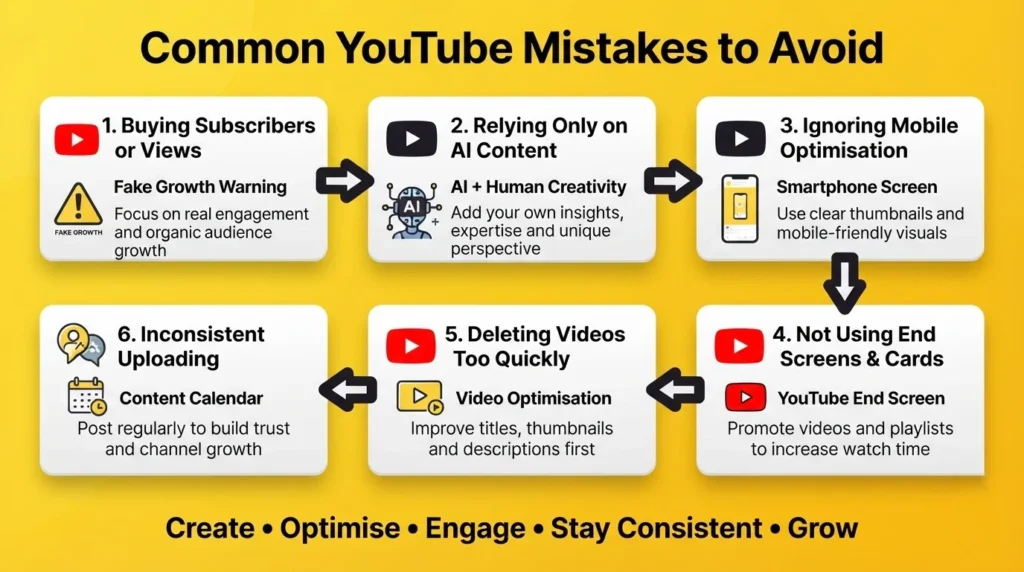
- Don’t Buy Subscribers or Views: Fake engagement doesn’t build a loyal audience and can harm your channel’s credibility and long-term growth.
- Avoid Publishing AI-Generated Content Without Your Own Value: Use AI as a helper, but always add your own knowledge, creativity, and insights to make your content original.
- Optimise Videos for Mobile Viewers: Since most people watch YouTube on smartphones, use clear thumbnails, readable text, and mobile-friendly visuals.
- Always Use End Screens and Cards: Recommend related videos and playlists to keep viewers on your channel and increase overall watch time.
- Improve Underperforming Videos Instead of Deleting Them: Update the thumbnail, title, or description before removing a video, as small changes can improve its performance.
- Maintain a Consistent Upload Schedule: Posting regularly helps build audience trust and signals to YouTube that your channel is active, supporting steady growth.
Legal Tips for YouTube Creators
- Use Copyright-Free Content: Only use music, images, videos, and graphics that you own or have permission to use.
- Avoid Copyright Infringement: Don’t upload copyrighted content without proper licences or fair-use justification.
- Disclose Sponsored Content: Clearly mention paid promotions, affiliate links, or brand partnerships.
- Respect Privacy: Get permission before filming or sharing identifiable people in your videos.
- Follow YouTube Community Guidelines: Avoid misleading, harmful, or policy-violating content to protect your channel.
- Keep Original Content: Add your own insights and creativity to avoid plagiarism and maintain monetisation eligibility.
Conclusion
Starting a YouTube channel is easier than ever, but knowing how to start a YouTube channel successfully and grow it requires consistency, patience, and continuous learning. Focus on choosing the right niche, creating valuable content, optimising your videos with YouTube SEO, and understanding your audience through analytics.
Use AI tools to improve your workflow, but always add your own expertise and creativity. Don’t worry about expensive equipment or instant success; every successful creator started with their first upload. Keep improving with every video, stay consistent, and provide genuine value to your viewers. With the right strategy and dedication, you can build a successful and profitable YouTube channel.
FAQs
1. How Do I Start A YouTube Channel In 2026?
Create a Google account, choose your niche, set up your channel, publish valuable content consistently, and optimise every video using YouTube SEO.
2. Do I Need Expensive Equipment To Start YouTube?
No. A smartphone, good lighting, and a decent microphone are enough to create quality videos as a beginner.
3. How Often Should I Upload Videos?
Aim for at least one quality video every week and maintain a consistent upload schedule.
4. When Can I Monetise My YouTube Channel?
You can apply for the YouTube Partner Program after meeting YouTube’s eligibility requirements, such as subscriber and watch-time thresholds.
5. Can AI Help Grow My YouTube Channel?
Yes. AI can help with script writing, research, editing, thumbnails, and SEO, but your own creativity and expertise remain essential for long-term success.