
A single podcast episode, interview, or webinar recording usually has more than one genuinely shareable moment buried inside it, a sharp answer, a funny exchange, a clear, quotable point. Finding all of them manually means rewatching the full video, once to catch the first moment, again for the second, again for the third, and then reformatting each one separately for whatever platform it’s headed to.
That process scales badly. The more shorts a single long-form video is meant to produce, the more times it effectively needs to be rewatched from start to finish, since each individual clip search is its own pass through the same material.
Here’s how to actually turn one long video into several shorts without that repeated rewatching.
Why Manually Finding Shareable Moments Doesn’t Scale
Manually pulling clips from a long recording means watching the whole thing with one specific kind of moment in mind, then doing it again with a different moment in mind for the next clip. Each pass is a real time cost, and it compounds directly with how many separate shorts a single long-form video is meant to produce.
On top of finding the moments themselves, each one still needs reformatting, cropped to a vertical frame, captioned, trimmed to a clean start and end point, before it’s actually ready to post. That reformatting step is its own manual task repeated once per clip, on top of the searching.
Directing An Agent To Find And Cut The Shorts In One Pass
Invideo Editor treats this as a single directed task rather than a separate manual search for each individual clip. Point it at a long-form recording and describe what kind of moments should become shorts, or how many to produce, and video editors can have an agent identify multiple candidate moments across the full recording in one pass, rather than requiring the video to be rewatched separately for each one.
That’s a meaningfully different process than manual extraction. Instead of searching for one moment at a time across several full rewatches, the direction covers the whole job at once, find several shareable moments from this recording, and the agent works across the entire video to surface them.
What Invideo Editor Adds: Turning One Project Into Multiple Versions Directly
Invideo Editor lets you edit videos online by directing an agent to turn a single long-form project into trailers, highlights, social cuts, and platform-specific versions, reformatted for the destination each one is headed to, without a separate manual pass for each individual short.
The timeline itself is a real, professional manual editor on its own, free to use whether or not an agent extracts a single short, so each resulting clip stays available for manual trimming or adjustment afterward.
What To Check After Automated Cut-Downs
Each short is worth reviewing as a standalone piece, specifically checking whether it makes sense without the surrounding context of the full recording. A moment that reads clearly in the middle of a longer conversation can lose its meaning entirely once it’s isolated, if it depends on something explained a few minutes earlier that didn’t make it into the clip.
It’s also worth confirming the platform-specific formatting actually landed correctly, aspect ratio, caption placement and timing, before publishing, since these details matter more for a short clip’s watchability than they do in a long-form video where a viewer has more patience to adjust.
Common Problems When Creating Multiple Shorts From One Video
A clip that depends on earlier context is the most common issue, a moment that’s genuinely compelling in the full recording can fall flat or confuse a viewer once it’s extracted without the setup that made it land originally.
Not reviewing each short individually is a related problem, treating the whole batch as automatically ready without checking whether each one specifically stands on its own.
Skipping a check on platform-specific formatting is the last common gap, a caption that’s timed slightly off or a crop that cuts off something important reads as a bigger flaw in a fifteen-second short than it would in a longer video.
Common Mistakes When Turning Long-Form Video Into Shorts
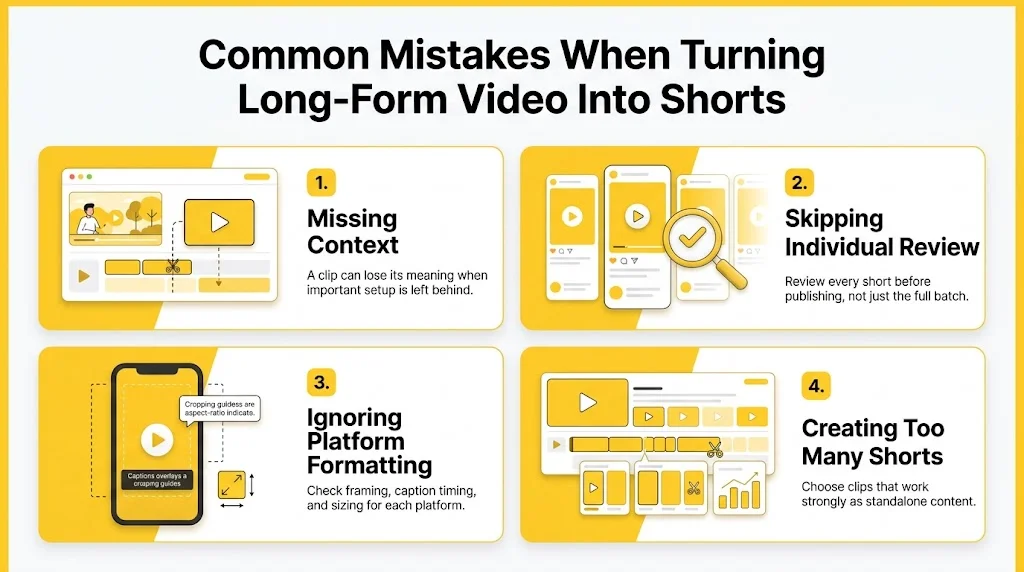
- Extracting a moment without checking whether it needs earlier context to make sense. A clip that depends on setup from earlier in the recording can lose its meaning once isolated.
- Assuming a batch of automatically generated shorts is ready to publish without individual review. Each one benefits from a specific check, not just the batch as a whole.
- Skipping a check on platform-specific formatting. Caption timing and framing issues are more noticeable in a short clip than in a longer video.
- Producing too many shorts from moments that aren’t genuinely strong on their own. Not every clip-worthy moment in a long recording actually works as a standalone short.
FAQs
How Many Shorts Can Reasonably Come From One Long-Form Video?
It depends on how much genuinely shareable material the recording actually contains. A longer, content-dense recording can reasonably produce several strong shorts; a shorter or less eventful one may only have one or two moments worth extracting.
Does A Short Need To Be Re-Edited After It’s Automatically Extracted?
Often a light review and trim is worth doing, checking that it makes sense standalone and that the formatting is correct, even when the initial extraction is strong.
What’s The Biggest Risk When Turning One Video Into Multiple Shorts?
Extracting a moment that depends on context from earlier in the recording. It can read as compelling in the full video and confusing or flat once isolated on its own.
Can These Shorts Be Formatted Differently For Different Platforms?
Yes, formatting can be directed per platform, a specific aspect ratio, caption style, or length, rather than producing one generic version and manually reformatting it for each destination afterward.