

It can be really difficult to get your content noticed online. Even well-made documents, slides, and presentations are frequently ignored, which reduces website traffic, engagement, and potential authority. Traditional backlink tactics can be time-consuming, and not all kinds of content are equally effective on various platforms. Important content runs the danger of being lost in the millions of other internet resources if it is not properly promoted.
One of the best methods to increase your visibility, draw in a relevant audience, and obtain high-quality backlinks that search engines value is to upload your PowerPoint presentations. You can present slides, reports, and visual information to users who are actively looking for educational materials using these platforms. Your presentations not only reach a wider audience by publishing on reputable websites, but they also contribute to the development of authority, targeted traffic, and the enhancement of your website’s online reputation.
This blog will explain what PPT submission sites are, why they are important for developing an online presence, and offer a list of working PPT submission sites where you may upload your presentations. Your presentations can become long-term digital assets for your company or blog by strategically using these sites to boost your SEO efforts, boost brand recognition, and generate steady traffic.
What Are PPT Submission Sites and How Do They Work?
PPT submission sites are online platforms that allow users to upload, share, and showcase PowerPoint presentations to a global audience. These websites allow presentations to be viewed, downloaded, and shared online rather than being kept on a personal computer. In order to make your slides show up in Google search results and reach people searching for related topics, many well-known PPT submission services also index presentations on search engines.
These websites are made to display your content in an easy-to-use and clear manner. You can provide a title, description, relevant tags, and connections to your website when you upload a presentation. While visitors can access your website by clicking on embedded or profile links, search engines use this information to comprehend your content. You may improve traffic, create high-quality backlinks, broaden the audience for your material, and raise brand awareness by effectively utilizing PPT submission platforms.
Top Benefits of PPT Submission for Better Rankings
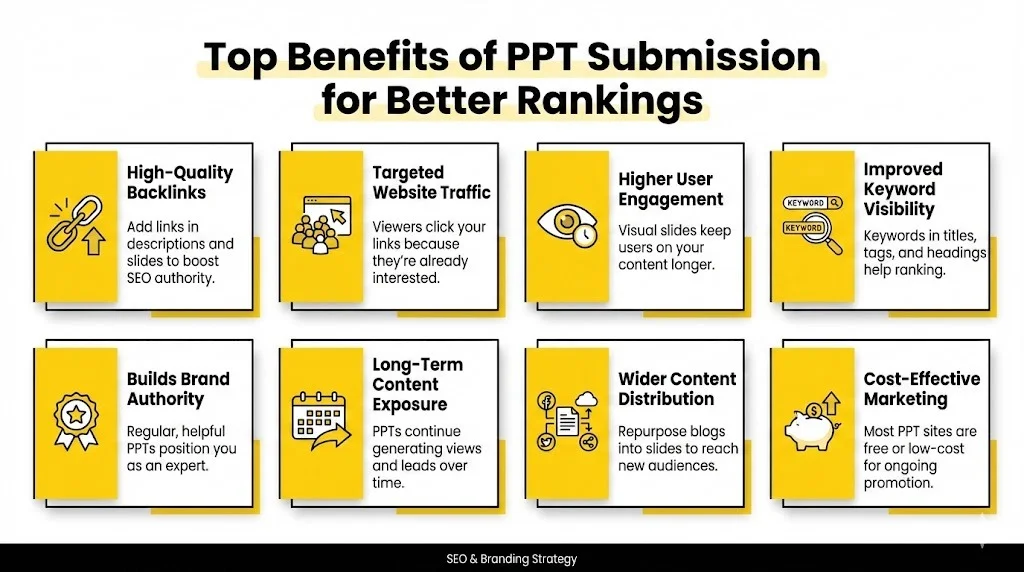
Sites of PPT submissions are not only file sharing sites. When implemented in a strategic manner, they are potent digital marketing platforms that can bring quantifiable SEO, branding and traffic outcomes.
Backlink Building of High Quality: The advantages offered by most PPT submission websites enable you to add links to a web site in the description of your PPT, the profile section and even in the slides themselves. These backlinks are an indication of trust and relevance to the search engines. The links that come along with your PPTs when published on authoritative sites will assist in enhancing your domain authority, positioning of your key words, and general SEO potential.
Increased Website Traffic: Users tend to follow your embedded links to read more when they come across your presentations when searching using the search engines or when searching on platforms. They already have an interest in your subject and thus this traffic is highly targeted.
Better User Engagement: PPTs are given in a beautiful and understandable format. The use of charts, infographics, icons, and short bullet points will make users spend more time viewing them than reading long blocks of text. Greater levels of engagement will minimize bounce rate and build on the brand credibility.
Enhanced visibility of Keywords: Targeted keywords in the titles of PPTs, headings of slides, descriptive and tagging can ensure that your presentations rank on the submission sites as well as in Google. This will give you more opportunities to be ranked on several related search terms and increase your organic visibility.
Brand Authority and Trust Building: Regular release of informative and professional presentations makes your business a source of knowledge. As users continue to view your content resolving problems and giving insights, your brand is bound to acquire power, popularity and credibility.
Long-Term Content Exposure: PPTs will be viewed even after a long time compared to advertisements or posts on social media. One quality presentation can be able to draw traffic, backlinks, and leads over months or even years and therefore submitting PPT is a long-term SEO act.
Wider Content Distribution: With PPT submission, you are able to reuse your old posts on the blog, reports, and guides and convert them into the slide format. This diversifies your content and makes it available on various platforms, offers higher exposure, and introduces your brand to new users that like to learn visually.
Efficient and Proxy Marketing: The vast majority of PPT submission sites are free or have very low plans. This suits them well with the start-ups, bloggers and small businesses, which do not require huge advertising budgets to engage in continuous promotion.
List of 110+ Best PPT Submission Sites
| S NO | PPT Submission Sites | DA | DR | SS |
|---|---|---|---|---|
| 1 | issuu.com | 94 | 93 | 2 |
| 2 | slideshare.net | 94 | 92 | 3 |
| 3 | scribd.com | 94 | 91 | 3 |
| 4 | en.calameo.com | 93 | 91 | 4 |
| 5 | academia.edu | 93 | 91 | 1 |
| 6 | depositfiles.com | 92 | 76 | 16 |
| 7 | en.calameo.com | 93 | 91 | 4 |
| 8 | yumpu.com | 92 | 90 | 3 |
| 9 | rapidshare.com | 93 | 78 | 1 |
| 10 | mediafire.com | 95 | 91 | 3 |
| 11 | wattpad.com | 92 | 86 | 1 |
| 12 | diigo.com | 91 | 86 | 2 |
| 13 | ziddu.com | 93 | 73 | 1 |
| 14 | 4shared.com | 94 | 83 | 6 |
| 15 | sendspace.com | 93 | 80 | 19 |
| 16 | zippyshare.com | 93 | 82 | 60 |
| 17 | lulu.com | 89 | 90 | 1 |
| 18 | slides.com | 81 | 83 | 1 |
| 19 | pearltrees.com | 84 | 82 | 33 |
| 20 | zoho.com | 88 | 91 | 6 |
| 21 | speakerdeck.com | 85 | 87 | 1 |
| 22 | visual.ly | 87 | 84 | 1 |
| 23 | docdroid.net | 82 | 83 | 1 |
| 24 | authorstream.com | 83 | 77 | 59 |
| 25 | authorstream.com | 83 | 77 | 59 |
| 26 | zshare.net | 86 | 71 | 5 |
| 27 | slide.com | 81 | 76 | 1 |
| 28 | smashwords.com | 88 | 86 | 2 |
| 29 | animoto.com | 89 | 85 | 1 |
| 30 | docstoc.com | 76 | 76 | 53 |
| 31 | emaze.com | 79 | 75 | 3 |
| 32 | speaking.alltop.com | 70 | 77 | 12 |
| 33 | officelive.com | 70 | 75 | -1 |
| 34 | free-ebooks.net | 75 | 75 | 2 |
| 35 | letitbit.net | 75 | 72 | 37 |
| 36 | 2shared.com | 76 | 71 | 56 |
| 37 | edocr.com | 74 | 74 | 17 |
| 38 | feedbooks.com | 77 | 73 | 3 |
| 39 | filefactory.com | 78 | 73 | 4 |
| 40 | divshare.com | 70 | 70 | 5 |
| 41 | uploading.com | 77 | 68 | 6 |
| 42 | ioffer.com | 70 | 63 | 22 |
| 43 | gamefront.com | 74 | 68 | 1 |
| 44 | esnips.com | 70 | 66 | 1 |
| 45 | yudu.com | 69 | 83 | 43 |
| 46 | bebee.com | 66 | 71 | 11 |
| 47 | brainshark.com | 62 | 80 | 5 |
| 48 | brainshark.com | 62 | 80 | 5 |
| 49 | sliderocket.com | 60 | 68 | 9 |
| 50 | pdf-archive.com | 68 | 66 | 4 |
| 51 | thinkfree.com | 67 | 64 | 8 |
| 52 | paperbackswap.com | 67 | 64 | 1 |
| 53 | badongo.com | 65 | 63 | 54 |
| 54 | storeboard.com | 64 | 78 | 3 |
| 55 | keepandshare.com | 65 | 77 | 10 |
| 56 | mirrorcreator.com | 61 | 60 | 1 |
| 57 | slideserve.com | 68 | 77 | 1 |
| 58 | dochub.com | 60 | 75 | 1 |
| 59 | manybooks.net | 65 | 75 | 4 |
| 60 | pdfescape.com | 62 | 74 | 3 |
| 61 | freepdfhosting.com | 60 | 72 | 32 |
| 62 | gigasize.com | 60 | 49 | 30 |
| 63 | isohunt.com | 69 | 61 | 1 |
| 64 | filestube.com | 68 | 51 | 21 |
| 65 | uploadarticle.com | 57 | 72 | 1 |
| 66 | powershow.com | 57 | 62 | 17 |
| 67 | presentermedia.com | 55 | 59 | 3 |
| 68 | huddle.net | 53 | 59 | 1 |
| 69 | docslide.us | 53 | 54 | 5 |
| 70 | 280slides.com | 51 | 52 | 43 |
| 71 | wikiupload.com | 51 | 44 | 38 |
| 72 | turboupload.com | 54 | 42 | -1 |
| 73 | present.me | 45 | 42 | 16 |
| 74 | present.me | 45 | 42 | 16 |
| 75 | trendyread.com | 54 | 29 | 78 |
| 76 | awaysomearticle.com | 58 | 18 | 2 |
| 77 | presentationpro.com | 46 | 46 | 1 |
| 78 | zentation.com | 40 | 45 | 17 |
| 79 | glasscubes.com | 40 | 59 | 2 |
| 80 | pdfhost.net | 47 | 52 | 17 |
| 81 | uploadingit.com | 49 | 39 | 45 |
| 82 | slideonline.com | 40 | 42 | 1 |
| 83 | myplick.com | 44 | 35 | 28 |
| 84 | worldranklist.com | 40 | 36 | 4 |
| 85 | bigupload.com | 49 | 36 | 4 |
| 86 | slideworld.com | 45 | 39 | 5 |
| 87 | bitroad.net | 45 | 27 | -1 |
| 88 | slideshop.com | 35 | 34 | 2 |
| 89 | bookswealth.com | 11 | 34 | 78 |
| 90 | ologames.com | 26 | 33 | 4 |
| 91 | doxtop.com | 30 | 32 | 29 |
| 92 | bloggersroad.com | 13 | 31 | 1 |
| 93 | slingfile.com | 39 | 31 | 12 |
| 94 | pinpdf.com | 31 | 35 | 11 |
| 95 | m62.net | 35 | 28 | -1 |
| 96 | gofile.io | 59 | 78 | 11 |
| 97 | howcube.com | 10 | 26 | 2 |
| 98 | theblogarena.com | 24 | 22 | 3 |
| 99 | sharepresentation.com | 36 | 40 | 7 |
| 100 | hdoxtop.com | 8 | 1.1 | 44 |
| 101 | blog.shopolop.com | 17 | 47 | 1 |
| 102 | vcasmo.com | 36 | 47 | 2 |
| 103 | slideshare.net | 94 | 92 | 3 |
| 104 | scribd.com | 94 | 91 | 3 |
| 105 | blog.freeadstime.org | 38 | 57 | 3 |
| 106 | wepapers.com | 39 | 57 | 4 |
| 107 | beyondbulletpoints.com | 36 | 37 | -1 |
| 108 | story.wallclassifieds.com | 26 | 45 | 1 |
| 109 | presentationload.de | 33 | 44 | 1 |
| 110 | article.classifiedsfactor.com | 26 | 43 | 1 |
| 111 | articles.h1ad.com | 22 | 43 | 5 |
| 112 | blog.giganticlist.com | 24 | 40 | 6 |
| 113 | gigabox.com | 38 | 37 | 12 |
Best Practices for PPT Submission to Boost SEO & Traffic
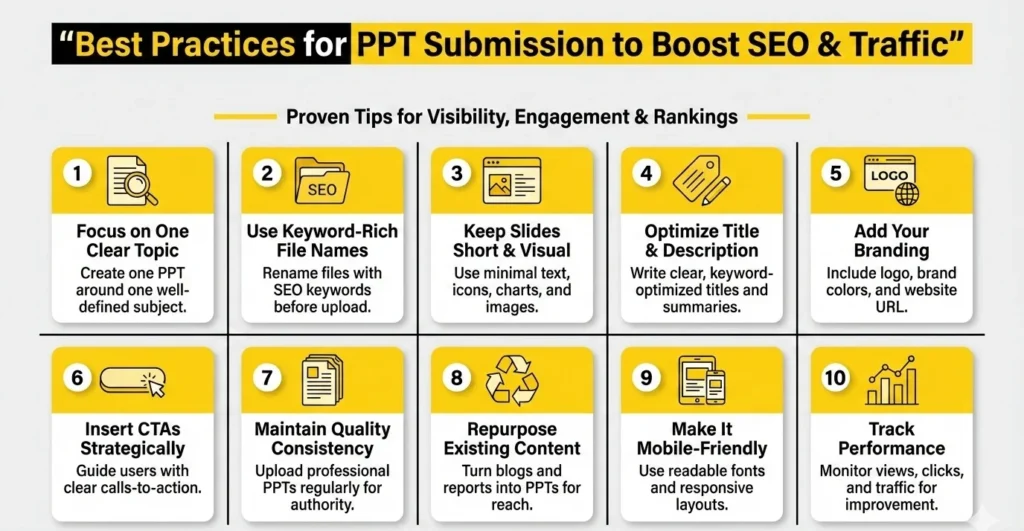
- Focus on One Clear Topic: Prepare one PPT based on one topic and it should be well-defined to enhance relevancy, targeting keywords and searchability.
- Use Keyword-Rich File Names: Before uploading, you should rename your file to SEO keywords (ex: ppt-submission-seo-guide.pdf).
- Keep Slides Short and Visual: Keep text, icons, charts and pictures to a minimum to simplify the slides and include interest in them.
- Maximize Title and Description: A clear and optimized title and a description are unconditional to enhance discoverability.
- Add Your Branding: Add your logo, brand colors and website URL to gain awareness and trust.
- Insert CTAs Strategically: There should be a good call-to-action with every several slides to lead the users to your offer or site.
- Ensure Quality Continuity: Be a regular source of information, with well-designed presentations that can be uploaded on a regular basis to create long term authority.
- Repurpose Existing Content: Scale the content distribution using blog posts, reports and guides converted into PPTs.
- Make sure it is Mobile-Friendly: Use easy to read fonts and layout that is easy on smartphones and tablets.
- Track Performance: Track the performance of monitoring views, clicks, and traffic to know which works and enhance the result of future PPTs.
Other Submission Sites
- Classified Submission Sites
- Forum Submission Sites
- Directory Submission Sites
- Profile Creation Sites
- Ping Submission Sites
- Article Submission Sites
- Guest Posting Sites
- Image Submission Sites
- Web 2.0 Submission Sites
- PDF Submission Sites
- Video Submission Sites
- Social Bookmarking Sites
Step-by-Step Guide to Create an SEO-Friendly PPT
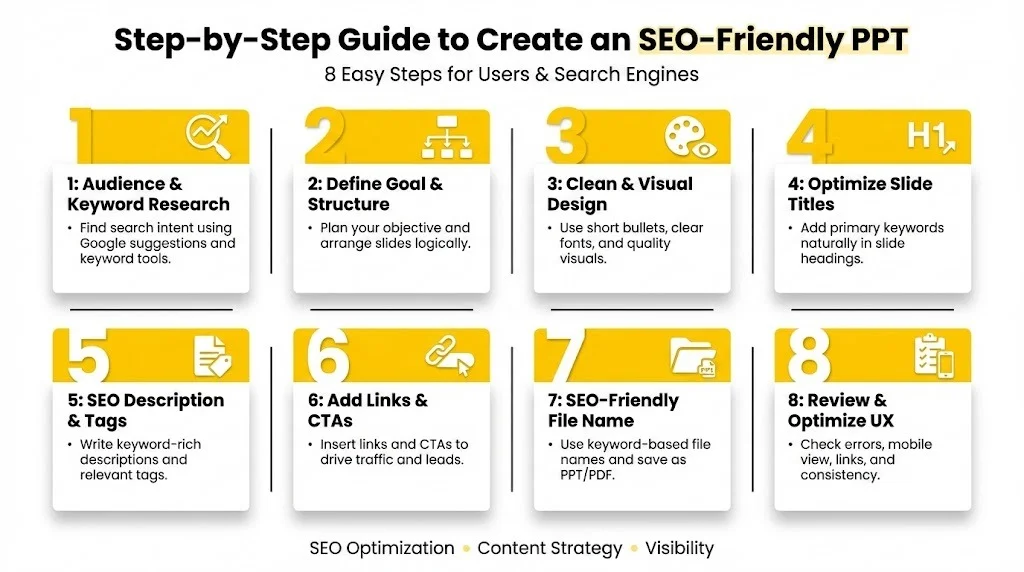
8 tips are easy steps that can be used to make your PPT effective to users and search engines.
Step 1:
It’s important to know what your audience wants before making your slides. To identify relevant terms, frequently asked questions, and hot subjects in your niche, use Google suggestions or keyword research tools. This guarantees that your PowerPoint meets actual user demands, is in line with search intent, and improves the likelihood that your audience will find and interact with it.
Step 2:
Start by defining the purpose of your PowerPoint, such as whether you want it to inform, create leads, increase brand recognition, or advertise a product. Plan your slides’ introduction, primary points, solutions, and conclusion in a logical order once the objective has been established. A well-structured presentation enhances comprehension and memory of the material while also making it simpler for viewers to follow.
Step 3:
Avoid overcrowded slides. Make short bullet points, use clear fonts, use the same color and use quality images or charts. Clean design enhances clarity, draws more attention to the users, and provides better opportunities of your PPT going viral.
Step 4:
Insert your primary keyword in the headings of the presentation and on the slide titles normally. This assists search engines to know your topic of content and enhances ranking potentials in Google and PPT sites.
Article: “Small business digital marketing ideas and tips.
Step 5:
Also, in the process of uploading, include a comprehensive description of the upload, with the use of key words and other supporting expressions. Always add the right tags to ensure your PPT shows up in the searches on platforms and the related contents.
Step 6:
Insert hyperlinks in slides and on the description. Include powerful calls-to-actions like:
“Visit our website”
“Download our free guide”
“Contact us today”
This turns the viewers to the visitors or the leads of the websites.
Step 7:
title your file with a keyword (e.g. ppt-submission-seo-guide.pdf). You should save it in the PPTX or PDF format so that it can be more compatible, easily accessed and shared across platforms.
Step 8:
Spelling, grammatic, slide positioning, mobile accessibility, and hyperlinking. Well-crafted user experience with a professional error-free PPT creates trust, enhancing the user experience which helps in long-term benefits related to the SEO.
How to Submit Your PPTs to High-Authority Sites
After creating a PPT that is SEO friendly, it is important to submit it to the popular PPT submission sites properly. Correct submissions will mean increased visibility, more backlinks and maximum reach.
1. Register an Account in Reliable PPT Sites: Begin by posting on trusted websites of PPTs like SlideShare, Scribd, AuthorSTREAM or SlideServe. Complete your profile information in a professional manner with your business name, business logo, business description and web address. One full profile makes it more credible and allows the viewers to believe in your brand.
2. Upload Your Presentation: Once you have logged in, upload your ppt or PDF file. Ensure that you have properly formatted the file and it should be clean in appearance and without errors. Certain sites will automatically convert your file into an online viewer format and thus become viewable on both desktops and mobiles.
3. Include an SEO-Optimized Title, Description and Tags: It is the most significant SEO measure. Compose an informative title with lots of keywords that state the subject in your presentation. Use your primary and supporting keywords to provide an in-depth description. Add pertinent labels so that your PPT will be visible on internal search and the relevant presentation segments.
4. Place Your Web Address in an opportunity position: In the description, and also (where possible) within the slides, add your web site address. These links are what are known as backlinks which promote domain authority and reference traffic. It is always important to make sure that the links are relevant to the landing pages.
5. Publish and Index Your PPT: Review all the information, publish your PPT. When it is live, it is visible to the users and searchable by the search engines. Now your presentation can begin to gain views, clicks and interaction automatically.
6. Market Your PPT to its fullest extent: Publish your PPT in LinkedIn, Facebook, Twitter, WhatsApp groups, Blogs, and email newsletters. There is promotion when it is starting, it will be more visible and more likely to receive shares and natural links.
Common Mistakes to Avoid in PPT Submission
Being cognisant of such mistakes can assist you in maximizing traffic, backlinks as well as brand impact.
- Posting Slides of Low Quality or Overloaded Slides: Blurred pictures, excessive text, bad design, or any confusing layout decreases the interest of the users. Unless your slides are appealing to the eye and understandable, people will not stay long. Invariable concentrations should be on clean design, legible fonts, and clear message.
- Ignoring SEO Optimization: The PPTs cannot be found easily unless they are uploaded with key words, descriptions, and tags. Your presentations will not rank on Google or even the ppt sites without SEO. Each upload must be optimized.
- Not Adding Website Links: This is because without adding your web site link you have missed the key SEO and marketing advantage. Your PPT can get a view with no backlinks and CTAs, creating no traffic and no leads.
- Plagiarism of Duplicate or Copied Content: Reposting the same PPT on platforms with no variation of the contents or copying of contents will be detrimental to your brand image and your credibility as an SEO. Never copy or paste presentations, always come up with original and value presentations or customize them to fit other platforms.
- Bad File naming and formatting: The posting of files under random names such as final123.pptx decreases the value of SEO. Always change the name of files with keywords and make sure it has the correct PPT/ PDF format.
- Skipping Promotion: It is not just enough to upload PPTs. Your text will not see much publicity without social sharing or outreach. Advertisement enhances access, traffic, and backlink.
- Not Tracking Performance: Neglecting analytics will not allow improvement. Keep track of monitor views, clicks, downloads and referral traffic to know what is successful and optimize future presentation.
- Inconsistent Posting: The impact of one or two PPTs will not be very strong in terms of SEO. Frequent submission develops power, enhances ranking capacity and retains your brand in view.
How to Track PPT Submission Performance
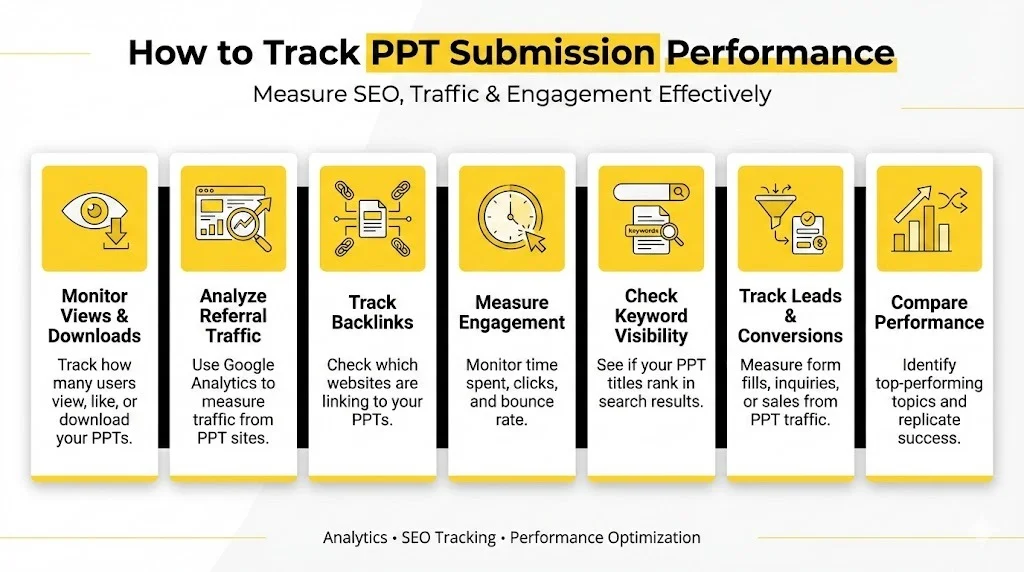
- Monitors Views and Downloads: See the number of people who are watching, liking, and downloading your presentations on PPT sites.
- Monitor Web Traffic: Monitor the referral traffic by using Google Analytics to identify the amount of referral traffic generated by PPT submission sites.
- Websites Backlink: Monitor the websites backlinking your PPTs with either Google search engine or SEO tools.
- Measure Engagement: Monitor time spent, bounce rate, and clicks to determine interest of the audience.
- Check Keyword Visibility: Check whether or not your PPT titles or topics are showing in a search.
- Track Leads and Conversions: Track the form fills, inquiries or sales made after referral traffic of PPT.
- Compare Performance: Determine the topics in PPT that do the best and repeat the strategies that have worked well.
Conclusion
PPT submission is an easy yet highly effective off-page SEO strategy that allows businesses to boost their online presence without heavy investment. By using PPT submission sites, you can publish well-designed, optimized presentations to earn quality backlinks, increase keyword visibility, and drive targeted traffic to your website. PPTs also serve as long-term digital assets, continuously promoting your brand, educating viewers, and generating engagement.
Together with effective key-word research, neat design, effective linking and frequent promotion, submission on PPT can go a long way in supporting your SEO strategy and branding. Regardless of you being a blogger, marketer, startup, or a business owner, regular PPT submissions can help you achieve sustainable growth, greater authority, and online prosperity.
FAQs
1. What is a PPT Submission Site?
A web site where you post and share presentations to get visibility, traffic and backlinks.
2. Does the Submission of PPT Assist in SEO?
It helps in off-page SEO, which enhances backlinking, visibility and targeted traffic.
3. What are the Most Optimal PPT Submission Sites?
The most popular are Slideshare, scribd, authorstream, slide serve and issu.
4. Is it on a Regular Basis or Not?
The optimal use of large-quality PPT is to post 2-4 of them every month to get the benefit of consistent SEO.
5. Can PPTs Rank on Google?
Correctly optimized PPTs may be found in search engines and generate organic traffic.